Container Apps
Container Apps enable you to run microservices and containerised apps on a serverless platform which runs on top of AKS. Container Apps manages the details of k8s and container orchestration for you. Containers support any Linux-based x86-64 container image and can use any development stack you choose.
Usecases include:
- API endpoints
- Background processing apps
- Event-driven processing
- Microservices
Features
Azure Container Apps can scale dynamically based on:
- Traffic
- Event driven processing
- CPU/mem load
- Any KEDA(?) supported scaler
With Azure Container Apps, you can:
- Run and manage the lifecycle of multiple container revisions
- Autoscale with any KEDA-supported scale trigger
- Enable HTTPS ingress without other Azure infrastructure
- Blue/green split traffic deployment
- Internal ingress for secure internal endpoints
- Build with Dapr (Distributed Application Runtime)
- Run private or public containers from any registry
- Manage with CLI, portal or ARM templates
- Provide an existing virtual network for your new container app environment
- Securely manage secrets
- Monitor logs with log analytics
Limitations
- Azure Container Apps can not run as root.
- Only Linux-based (
linux/amd64) images are supported.
Environments
Individual container apps are deployed to a single container apps environment. which acts as a secure boundary around groups of container apps. You may want containers to share an environment when you need to:
- Manage related services
- Deploy different apps to the same virtual network
- Instrument Dapr applications that communicate via the Dapr service invocation API
- Share Dapr configuration
- Share a log analytics workspace
However, you may want container apps to not share an environment if:
- They shouldn't share resources
- They can't communicate via the Dapr service invocation API
Microservices
Azure Container Apps supports microservice deployment with:
- Independent scaling, versioning and upgrades
- Service discovery
- Native Dapr integration
Dapr
The Distributed Application Runtime (Dapr) is an open-source collection of incrementally adoptable features that simplify the authoring of microservice-based apps. Dapr provides capabilities for enabling service intercommunication through messaging via pub/sub or reliable service-to-service calls.
The Container Apps platform:
- Provides a managed and supported Dapr integration
- Handles Dapr version upgrades seamlessly
- Exposes a simplified Dapr interaction model
Like auth features, Dapr runs as a sidecar to your Dapr enabled container apps. Dapr APIs can be invoked from your application via HTTP or gRPC on ports 3500 and 50001 respectively. The Dapr sidecars communicate with Dapr API components which you have chosen to enable. You can control which of your apps have access to particular Dapr components via the application scopes of the resource template.
Dapr features
| Dapr API | Description |
|---|---|
| Service-to-service invocation | Discover services and perform reliable, direct service-to-service calls with automatic mTLS authentication and encryption. |
| State management | Provides state management capabilities for transactions and CRUD operations. |
| Pub/sub | Allows publisher and subscriber container apps to intercommunicate via an intermediary message broker. |
| Bindings | Trigger your applications based on events |
| Actors | Dapr actors are message-driven, single-threaded, units of work designed to quickly scale. For example, in burst-heavy workload situations. |
| Observability | Send tracing information to an Application Insights backend. |
| Secrets | Access secrets from your application code or reference secure values in your Dapr components. |
| Configuration | Retrieve and subscribe to application configuration items for supported configuration stores. |
Revisions
Revisions are immutable snapshots of versions of your container app. Revisions can be used to release a new version of your app or quickly revert to an earlier version.
You have control over which revisions are active and where external traffic is routed (blue/green). By default, revisions are a semi-random string of alphanumeric chars, but they can be customised for easier identification.
- Revisions can be manually set in the ARM template, through the CLI, or in the portal.
- Revisions are automatically created when any
revision-scopechange is made, i.e. changes within theproperties.templatesection of the resource template.
e.g.
az containerapp update --name <NAME> --image <IMAGE>
- If the update contains
revision-scopechanges then a new revision is created
You can use az containerapp revision list to list all revisions associated with your container app
az containerapp revision list \
  --name <APPLICATION_NAME> \
  --resource-group <RESOURCE_GROUP_NAME> \
  -o table
Secrets
You can provide a --secrets parameter in the CLI to provide secrets. Secrets are a space-delimited list of key-value pairs in the format {key}={value}.
If you have created a keyvault entry for your secret in the Azure portal, you can reference these secrets using a secretref: prefix in the value of your key-value pair.
{key}=secretref:{vaultKeyName}
Auth
Container Apps provides built-in auth features to secure your external ingress-enabled app with no/low code. These features do not require any particular language, SDK, expertise or even code.
Auth features require HTTPS so allowInsecure must be disabled in your app ingress configuration.
You can configure auth with or without restricted access to your content by configuring the Restrict access setting.
Require authenticationAllow unauthenticated access
Architecture
Container App auth middleware runs as a sidecar container in each replica of your app. When enabled, all incoming requests first pass through this sidecar before being passed to your app.
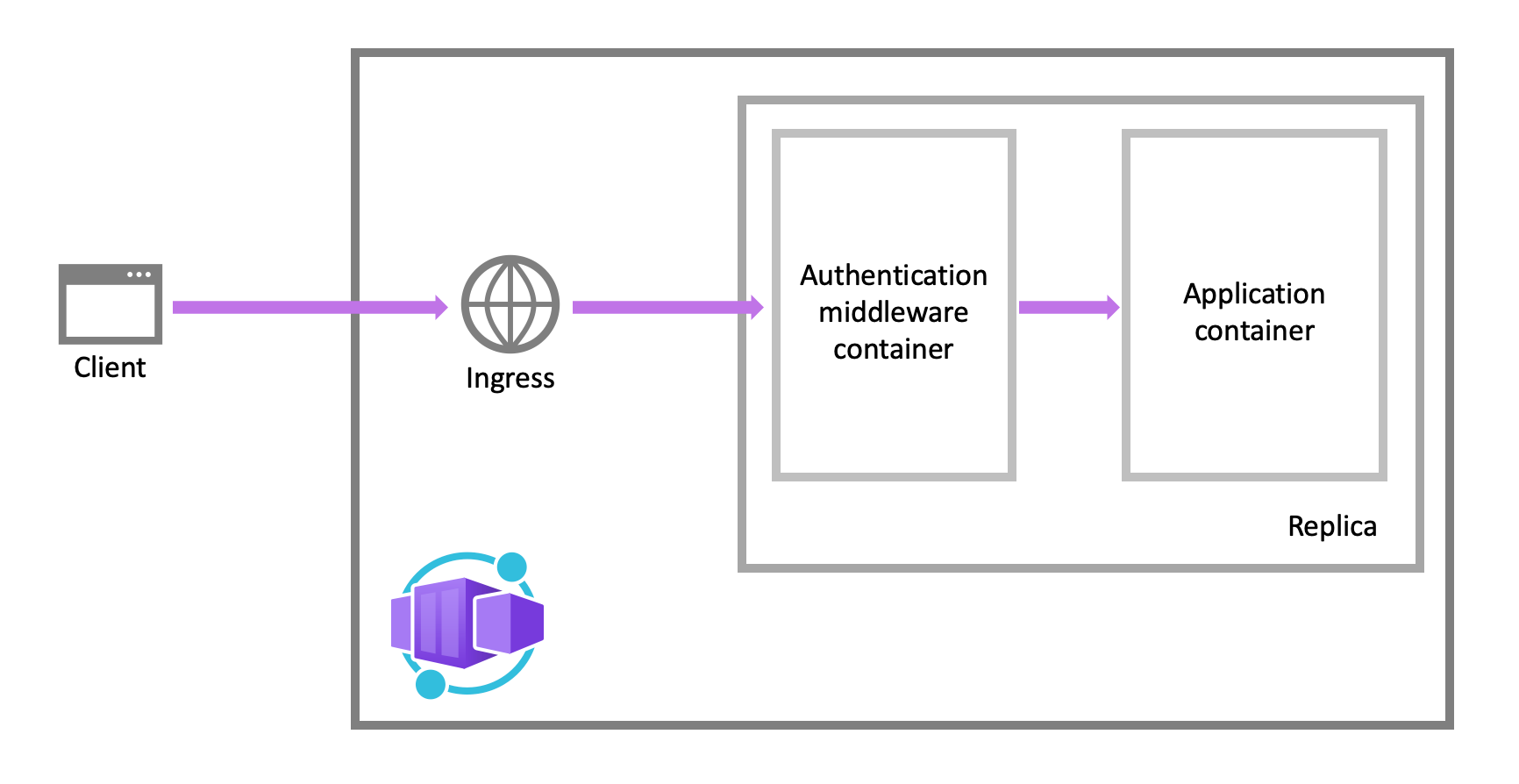
This middleware handles several things for you:
- Authenticates users with your selected providers
- Managed auth sessions
- Injects identity information into request headers for use in your app
Since the auth middleware is running as a sidecar, it is language and framework agnostic.
Identity providers
Container Apps uses federated identity where third party identity providers manage the user identities and authentication flow for you. The following table containers identity providers which are supported by default:
| Provider | Sign-in endpoint | How-To guidance |
|---|---|---|
| Microsoft Identity Platform | /.auth/login/aad |
Microsoft Identity Platform |
/.auth/login/facebook |
||
| GitHub | /.auth/login/github |
GitHub |
/.auth/login/google |
||
| X | /.auth/login/twitter |
X |
| Any OpenID Connect provider | /.auth/login/<providerName> |
OpenID Connect |
| When you use one of these providers, the endpoint is exposed for auth token validation from the provider. |
You have two options for how your auth flow works when using this feature:
Without provider SDK
Mainly for browser apps, provider sign in page is presented, token is passed to auth sidecar.With provider SDK
Mainly for browserless apps, provider SDK is used to sign in, token is passed to auth sidecar.
CLI
# install/upgrade to latest container app extension
az extension add --name containerapp --upgrade

# register required Azure Container Apps namespaces for your subscription
az provider register --namespace Microsoft.App
az provider register --namespace Microsoft.OperationalInsights

# create an environment
az containerapp env create \
	--name my-container-env \
	--resource-group myResourceGroup \
	--location myLocation

# create a container app to go into the environment
az containerapp create \
	--name my-container-app \
	--resource-group myResourceGroup \
	--environment my-container-env \
	--image mcr.microsoft.com/azuredocs/containerapps-helloworld:latest \
	--target-port 80 \
	--ingress 'external' \   # accessible from the public internet
	--query properties.configuration.ingress.fqdn
Configuration
The following is an example ARM template for a configured Azure Container App. The containers array exists in the properties.template section of the file.
"containers": [
  {
    "name": "main",
    "image": "[parameters('container_image')]",
    "env": [
      {
        "name": "HTTP_PORT",
        "value": "80"
      },
      {
        "name": "SECRET_VAL",
        "secretRef": "mysecret"
      }
    ],
    "resources": {
      "cpu": 0.5,
      "memory": "1Gi"
    },
    "volumeMounts": [
      {
        "mountPath": "/myfiles",
        "volumeName": "azure-files-volume"
      }
    ]
    "probes":[
        {
            "type":"liveness",
            "httpGet":{
            "path":"/health",
            "port":8080,
            "httpHeaders":[
                {
                    "name":"Custom-Header",
                    "value":"liveness probe"
                }]
            },
            "initialDelaySeconds":7,
            "periodSeconds":3
// file is truncated for brevity
Multiple containers
One Container App can container one or more containers. Multiple containers in a single app is an implementation of the sidecar pattern. Containers in a single app share hard disk and network resources and adhere to the same applicationlifecycle.
Examples of sidecars:
- An agent that reads logs from the primary container on a shared volume and forwards to a logging service.
- A background process that refreshes a shared volume cache used bty the primary container.
To run multiple containers in a container app, add more than one container to the containers array in the container app ARM template.
Registries
You can deploy containers from images in private repositories by providing the credentials in the properties.configuration section of the ARM template.
{
  ...
  "registries": [{
    "server": "docker.io",
    "username": "my-registry-user-name",
    "passwordSecretRef": "my-password-secret-name"
  }]
}